
How to Find Free Stock Photos in Wix

Updated: Sep 23
Good website photos make a huge difference—but that doesn’t mean you need to hire a photographer or spend hours searching the internet every time you need an image.
Wix has several stock-photo options built directly into the Media Manager, including free images from Wix, free photos from Unsplash, and paid images from Shutterstock.
That means you can search for professional photos without leaving your Wix website editor.
Here’s where to find them, how the different image libraries work, and a few tips for choosing stock photos that actually make your website look better.
Does Wix Have Free Stock Photos?
Yes.
Wix gives you access to free media directly inside the Wix Media Manager.
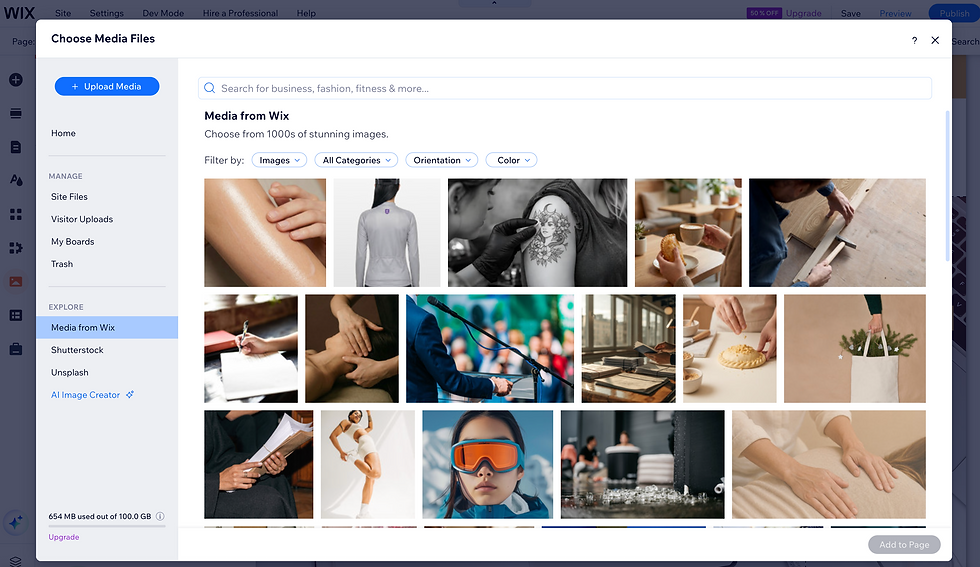
Depending on what you’re looking for, you can browse:
Media from Wix — free photos, illustrations, patterns, videos, shapes, and other visual elements
Unsplash — free high-resolution stock photography
Shutterstock — premium stock images and videos available for purchase
You can search these libraries while you’re already working on your website, so you don’t have to download an image from another site and then upload it separately.
Where to Find Stock Photos in Wix
You can access Wix’s stock media whenever you’re adding or changing an image.
From the Wix Editor, open the Media Manager and look for the available media libraries.
Depending on which Wix editor you’re using, the exact buttons may look slightly different, but you’ll generally see options for:
Media from Wix
Unsplash
Shutterstock
Your own Site Files or uploads
You can use the search bar to look for something specific instead of scrolling through thousands of images.
For example, instead of searching for something broad like business, try a more descriptive search such as:
pottery studio
sewing hands
coffee shop interior
therapist office
watercolor supplies
small business packaging
The more specific your search, the more likely you are to find an image that actually fits your brand.
Here are some examples of free stock images pulled right from the Wix Media Manager:
How to Use Free Wix Images
Wix has its own library of free media that you can use directly on your Wix website.
This includes more than just traditional stock photography. You can also find illustrations, patterns, videos, icons, and other visual elements.
To use one:
Open the Media Manager.
Choose Media from Wix.
Search or browse the available media.
Select the image you want.
Add it to your page.
One important thing to know is that Wix’s free media is licensed for digital use within Wix.
So while you can use those images on your Wix website and within Wix tools, you generally shouldn’t assume you can download a Wix stock image and use it somewhere completely unrelated, like printed marketing materials or another website platform.
How to Use Unsplash Photos in Wix
Wix also integrates directly with Unsplash, which gives you access to a huge library of free, high-resolution photography.
I often like Unsplash when I’m looking for imagery that feels a little less like traditional corporate stock photography.
You can find things like:
Lifestyle photography
Workspaces
Landscapes
Creative processes
Food
Architecture
People
Textures and detail shots
To use an Unsplash photo, open the Media Manager, choose Unsplash, search for the type of image you need, and add it directly to your page.
Unsplash images are royalty-free, but they’re still subject to Unsplash’s licensing terms, so it’s always a good idea to understand the rules around how an image can be used.
How Does Shutterstock Work in Wix?
If you can’t find the right free photo, Wix also gives you access to Shutterstock directly through the Media Manager.
Unlike Wix media and Unsplash, Shutterstock images are paid.
You can search the Shutterstock library inside Wix, purchase the image or video you want, and the purchased media will automatically be added to your Media Manager.
This can be useful when you need something very specific and the free options just aren’t giving you what you need.
For many small-business websites, though, I’d start with your own photos, Wix’s free media, and Unsplash before paying for stock images.
Can You Use Wix Stock Photos Outside of Wix?
This depends on where the image came from.
Free Wix media: Wix says these files are intended for digital use within Wix only.
Unsplash: Images are provided by Unsplash and are subject to Unsplash’s licensing terms.
Shutterstock: Your use of the image depends on the Shutterstock license you purchase.
This is also why I recommend avoiding the habit of simply finding an image through a Google image search and saving it to your website.
Just because an image appears online does not mean you have permission to use it.
Using Wix’s built-in media libraries gives you a much clearer path to finding images you can actually use.
How to Choose Stock Photos That Don’t Look Like Stock Photos
Stock photography can be incredibly useful—but it can also make a website feel generic if every photo looks like it came from a corporate brochure.
You know the type:
A group of people in suits pointing enthusiastically at a laptop.
A business owner shaking hands with someone in a conference room.
A person staring dramatically at a spreadsheet.
Instead, try searching for imagery that supports the feeling of your business.
For example, if you run a creative business, you might look for close-up images of tools, materials, hands at work, or the environment where the work happens.
If you own a wellness business, you might look for calming spaces, natural textures, or detail shots instead of searching for something as literal as woman at therapy appointment.
In general, I like to use original photos for the things that make a business unique—your team, your products, your space, your work—and stock photography to fill in the gaps.
That combination usually feels much more authentic than trying to build an entire website from stock photos.
Keep Your Stock Photos Consistent
Another thing that can make stock photography look obvious is mixing completely different visual styles.
You might have one image that’s bright and airy, another that’s dark and dramatic, and another with completely different colors and lighting.
Even though the individual photos are nice, together they can make the website feel disconnected.
As you choose images, look for some consistency in things like:
Lighting
Color palette
Backgrounds
Image style
Overall mood
You don’t need every image to look identical. You just want them to feel like they belong on the same website.
Crop and Position Your Images for the Space
Finding the right image is only part of the job.
You’ll often need to crop or reposition it so that it actually works within your website layout.
For example, an image that looks great as a square might not work well as a wide website banner.
Pay attention to where the subject of the photo sits and leave enough negative space around important text.
Wix also has built-in image-editing tools that can help you crop, adjust, and reposition images without needing separate editing software.
And always take another look at the image on mobile. A crop that looks perfect on desktop can sometimes cut off the most important part of the photo on a smaller screen.
Use Stock Photography as a Tool, Not a Replacement for Your Brand
There’s nothing wrong with using stock photography on a professional website.
The goal isn’t to avoid stock images completely. It’s to use them intentionally.
Your website should still feel like your business.
Whenever possible, use your own photos for the people, products, services, and spaces that make your business unique.
Then use Wix’s stock-photo libraries when you need supporting imagery, backgrounds, detail shots, or something you simply don’t have a photo of.
That’s usually the sweet spot.
Watch the Step-by-Step Wix Tutorial
Want to see exactly where these stock-photo libraries are located inside Wix?
In the video below, I walk through how to find and use stock photography directly inside your Wix website.
Looking for more easy to follow tutorials? Check out some of my other guides here:
Need Help With Your Wix Website?
If your website has all the right information but the design still doesn’t feel quite right, you can book a 1-on-1 Wix training and troubleshooting session with me.
We can work together over screen share to improve your layout, images, mobile design, or whatever else is making your website feel unfinished.

Comments