
How to Choose a Domain Registrar: 5 Things to Check Before You Buy

Disclosure: This article and the video tutorial included were sponsored by Wix. I work closely with Wix to create clear, accurate, educational content for Wix users.
TL;DR
To choose a domain registrar, confirm it is ICANN-accredited, compare the renewal price instead of only the first-year price, and check for WHOIS privacy, domain lock, and easy DNS management. Then decide whether you want your domain, website, and email in one dashboard, and look at how easy the account and support are to use. The cheapest first-year price matters less than where you want to manage your domain for years.
The registrar with the lowest first-year price is not always the best place to register a domain name. A registrar does more than sell you a name. It also manages that registration for as long as you keep the domain. This guide covers what to compare before you buy: accreditation, renewal costs, privacy and security, setup, and support. It also walks through what registration looks like with Wix Domains.
What is a domain registrar?
A domain registrar is a company that lets you search for, register, and manage a domain name. If you want a name like yourbusiness.com, the registrar is the company you use to register it and to manage it afterward.

Registrars also give you access to domain settings, DNS records, renewal settings, and registration information. That makes your registrar responsible for helping you manage one of the most important pieces of your online presence. Because of this, the cheapest deal available today should not be the only thing that decides where you register.
Is the registrar ICANN-accredited?
Check for ICANN accreditation first. ICANN is the organization that oversees important parts of the global domain name system, and an ICANN-accredited registrar has met standards for domain management and security.
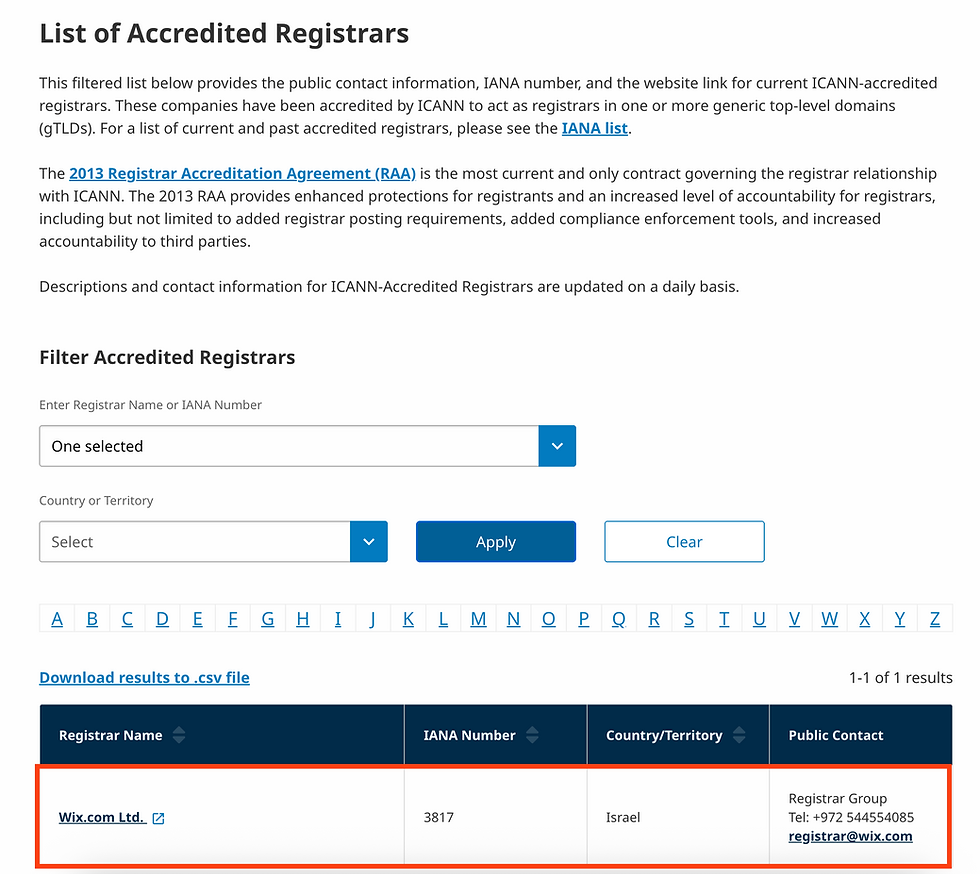
Confirm accreditation before you look at pricing, bonus features, or how good a registrar’s website looks. You are trusting this company to manage the registration of your domain, so you want to know it operates within established industry standards. The easiest check is to look up the registrar in ICANN’s accredited registrar directory. Wix Domains is listed there as an ICANN-accredited registrar.
How much does a domain registrar really cost?
Compare the renewal price, not only the first-year price. Many registrars advertise a low introductory price for year one. That can be a good deal, but most people keep a business domain for years, not one year.
Once a domain is attached to your website, your email address, your business cards, and your marketing, you will likely renew it every year. So ask two questions when comparing registrars:
What does this domain cost today?
What will it cost to renew it next year?
Also check whether auto-renewal is available and how easy it is to manage. A cheap first year helps, but transparent long-term pricing is more useful when you are choosing where to keep your domain.
Which privacy and security features matter?
Look for WHOIS privacy protection, domain locking, easy DNS management, and SSL. You do not need to be a technical expert to own a domain, but you do want these tools to exist and to be easy to find.
WHOIS privacy protection. When you register a domain, contact information is associated with the registration. WHOIS privacy protection keeps your personal contact details out of the public WHOIS database by replacing them with the registrar’s information. Ask whether privacy protection is available. With Wix Domains, you can add WHOIS privacy protection when you register a domain. Wix Domains also offers DNSSEC (Domain Name System Security Extensions), which helps protect your site from cyberattacks by adding a security seal to your domain.
Domain lock. A domain lock is a security setting that helps prevent your domain from being transferred to another registrar without your authorization.
DNS management. DNS, or the Domain Name System, tells browsers and email services where to find the things connected to your domain, like your website or your business email. You do not need to become a DNS expert. But if you ever need to update those settings, you want them to be easy to find and manage.
SSL certificates. SSL is the technology that encrypts the connection between a visitor and your website. It gives you the secure HTTPS connection you see in the browser. All Wix websites and custom domains include a free SSL certificate that activates automatically, at no extra cost.
What matters most is that your registrar gives you the tools to manage and protect your domain, without making those tools hard to find or use.
Should you buy your domain and website tools in one place?
It depends on how much you want to keep track of. Some people are happy to buy a domain from one company, build a website somewhere else, and run business email through a third provider. That setup works.
For beginners, though, keeping more of these pieces in one dashboard can make life simpler. Running a business already gives you plenty to track. Ask yourself: do I want my domain, website, DNS settings, and business email managed in the same place, or am I comfortable managing them separately?
With Wix Domains, you can manage your domain, DNS settings, website, and business email from your Wix dashboard. If you already plan to build your website with Wix, that means you are not jumping between accounts. Bundling is not automatically right for everyone, but it is worth considering. The question is not only where you can buy the domain. It is also where you want to manage it for the next several years.
What should you look for in registrar support and account management?
Look for a dashboard that is easy to understand and customer support you can reach when something goes wrong. When everything works, a registrar feels almost invisible, and that is the goal. But if you cannot access your domain, change DNS settings, renew, or connect your domain to another service, the quality of the account experience matters a lot.
Before you buy, check these points:
Is the dashboard easy to understand?
Can you clearly see your renewal settings?
Can you find your DNS records?
Can you manage privacy settings?
Can you transfer your domain later if you need to?
What kind of customer support is available?
You do not need to plan for every possible problem. You just want a registrar that makes it reasonably easy to manage your domain after you buy it. Buying a domain takes a few minutes. Managing it can last for years.
How do you register a domain with Wix?
Registering with Wix takes a few steps, and pricing and privacy choices appear along the way. Here is the process using Wix Domains:
Search for a domain. Go to the domain search tool and enter the name you want. Wix checks whether it is available and shows options across different domain extensions.
Review the pricing. Once you find a domain, Wix shows both the first-year price and the renewal price you will pay after that. The first-year price may be free with an eligible Wix plan.
Choose how to buy. You can purchase the domain on its own, or get the domain free for the first year with an eligible site plan. The example in the video buys the domain on its own.
Pick a registration period. Wix lets you register a domain for 1 to 10 years, depending on the extension and registration flow.
Enter your contact information, then choose your privacy settings. WHOIS privacy protection can be added at checkout.
Complete checkout. Once the domain is registered, you can manage it from your Wix dashboard, including DNS settings, renewal settings, and other domain management tools.
If you are building your website with Wix, your domain and website are managed in the same place instead of across separate accounts.
How do you choose the right domain registrar?
Focus on five things:
ICANN accreditation.
Transparent renewal pricing.
Privacy and security options.
Easy DNS and domain management.
A setup that fits the way you build and manage your website.
The cheapest first-year price is not necessarily the most important factor, because you may manage this domain with the same company for years. Instead of asking only “Where can I get this domain cheapest today?”, ask “Where do I want to manage this domain long-term?”
Frequently asked questions
What is the most important thing to check when choosing a domain registrar?
ICANN accreditation is the first thing to check. An ICANN-accredited registrar has met standards for domain management and security. You can confirm it by looking up the registrar in ICANN’s accredited registrar directory before you compare prices or features.
Is the cheapest domain registrar the best choice?
Not necessarily. A low first-year price can be a good deal, but you will probably renew your domain year after year. Compare the renewal price, check how easy auto-renewal is to manage, and think about where you want to manage the domain long-term.
What is WHOIS privacy protection?
WHOIS privacy protection keeps your personal contact information out of the public WHOIS database by replacing it with the registrar’s information. When you register a domain, contact details are associated with the registration, so it helps to check whether your registrar offers this option. With Wix Domains, you can add it during the purchase flow.
What does a domain lock do?
A domain lock is a security setting that helps prevent your domain from being transferred to another registrar without your authorization. It is worth checking that your registrar offers one. It is also worth confirming that you can still transfer your domain later if you choose to.
Should I buy my domain and website from the same company?
It can help, especially for beginners. Keeping your domain, website, DNS settings, and business email in one dashboard means fewer accounts, logins, and renewal settings to track. With Wix Domains, you can manage all of these from your Wix dashboard. Managing them separately also works, so it comes down to how much you want to keep in one place.
Can I register a domain with Wix without building a website first?
Yes. Wix lets you register a domain without first building a website. You can also get a domain free for the first year with an eligible site plan, or purchase the domain on its own.

Watch the full video: How to Choose a Domain Registrar (Before You Buy) https://youtu.be/NDPRh1otsSU, on the Wix Made Simple channel.
Comments